
Best tools for creating professional email content
- Monty Clicksworth

- May 13
- 5 min read
Updated: Jun 22
Email marketing is the best way to contact your potential and returning customers directly - but are you using it effectively?
If you’re a small business or marketing team, you probably don’t have the resources to outsource your email function to an expensive agency or the bandwidth to manage it internally.
But equally, it can feel like a mind field when browsing for the right tool to support your marketing plans.
The good news is there are lots of options to choose from, but the bad news is, this can create confusion. You might be asking yourself, how does this tool handle data? Can I integrate it with my CRM? How advanced are the design elements?
We’re trying to demystify the world of email marketing and give you the best insight on which tools work best for what.
We’ll break it down into 4 major categories:
The best tools for design
The best tools for scheduling
Tools for data and analytics (including email lists)
Websites for creative inspiration
All-in-one platforms
Let’s get into it!
An overview of platforms
Before we get into the nitty-gritty, here’s a good overview of how some platforms handle analytics, automation, design, and technical aspects.
Platform | Core Purpose | Strength | Analytics Level | Ease of Use | 💰 Price (typical in £) |
Mailchimp | Simple email marketing | Easy newsletters + basic automation | Basic | Very easy | Free → ~£8–£160+/month |
Brevo | All-in-one SMB email + CRM | Best value + transactional email + SMS | Medium | Easy | Free → ~£7–£80/month (enterprise £400+) |
Mailjet | Email + API + collaboration | Developer + team workflows | Basic–Medium | Medium | Free → ~£7–£40/month |
HubSpot | CRM + marketing + sales system | Full customer lifecycle + pipeline tracking | Advanced | Medium–Hard | Free CRM → ~£15–£1,600+/month (enterprise £8K+) |
Klaviyo | Ecommerce marketing + retention | Revenue-driven email + Shopify integration | Advanced (ecom-focused) | Medium | Free → ~£15–£2,400+/month |
Braze | Enterprise customer engagement platform | Real-time omnichannel orchestration | Very Advanced | Hard | ~£50K–£400K+/year+ |
Stripo | Email design tool (not sending platform) | Best-in-class email template design | None (design only) | Medium | Free → ~£15–£75+/month |
The best tools for design
One of the first things you might need to consider if you’re keen on building an email flow for your business is what it’s actually going to look like.
The aesthetic of your email will typically be influenced by its purpose.
For example, if you want to send a newsletter, you might want it to contain design elements for article images, case studies, and spotlighted themes. Whereas a product highlight email might need interactive visual slideshows and buttons.
This essentially means you need design flexibility, plus a user-friendly design tool - something instinctive.
Canva

If you’re getting started with design and need something beginner-friendly, Canva is a great choice. Not only is it multi-functional, you can use it for email visuals, as well as socials and website, but it’s very cost-effective too.
On the platform, you can design visual banners, export icons, and find some great inspiration from other creators.
Cost: Low (subscription-based)
Expertise: Beginner-friendly
Stripo

Like Canva, Stripo isn’t an email platform for scheduling; instead, it’s an advanced design system where you export HTML into other tools.
One of its strengths is its modular design, which makes product blocks, banners, and CTAs really easy to make. It’s better for larger organisations to use it as it ensures greater brand consistency and easier scalability.
You can integrate it into many platforms, including Klaviyo, Mailchimp, and HubSpot.
Cost: Low (subscription-based)
Expertise: Intermediate
Klaviyo

Unlike Canva and Stripo, Klaviyo is an actual email design platform, specially designed for e-commerce brands. This means you don’t just export the designs but can build the full email design structure too.
Its drag-and-drop design style means you can utilise elements like sections, columns, and reusable blocks easily in the platform.
While it started primarily as an automation tool, its design features have improved significantly.
Cost: Low - mid (based on number of contacts)
Expertise: Intermediate
The best tools for scheduling
Aside from the design, you’ll also have to think about the operational side of emails, aka how you can schedule your emails (time, date), some of the details like what sender information and constructing subject lines.
The last thing you want is to worry about an email not being sent on time or a system that keeps making mistakes.
Brevo

Brevo is the ideal platform for marketers who want an all-in-one email platform that can handle marketing, transactional and informational email campaigns.
Because it handles so many email types, it has quite a sophisticated scheduling system, and includes aspects like:
Scheduling for a specific date and time
Scheduling for different time zones
Send emails immediately or later
Queue campaigns for more complex email journeys
Cost: Low - mid (based on number of emails sent)
Expertise: Beginner-friendly
MailJet

Mailjet is a tool suitable for both developers and marketers. It’s built to be very team-friendly, making collaboration easy on the platform with features like open editing, comments, and locked sections in the design builder.
Additionally, it’s an API-first email platform, which means you can plug it into other things, such as lead gen forms, and platforms like Wix and WordPress.
Cost: Low - mid (based on number of contacts)
Expertise: Beginner-friendly
Tools for email data and analytics (including email lists)
For modern-day marketing teams and businesses, having access to data is essential when it comes to curating effective email campaigns.
Knowing data around open rates, click-through rates and unsubscribes can tell you so much about your contact list as well as the content you are sending. The best platforms will have extensive dashboards that give you insights, tips & tricks to building healthier email campaigns.
Klaviyo
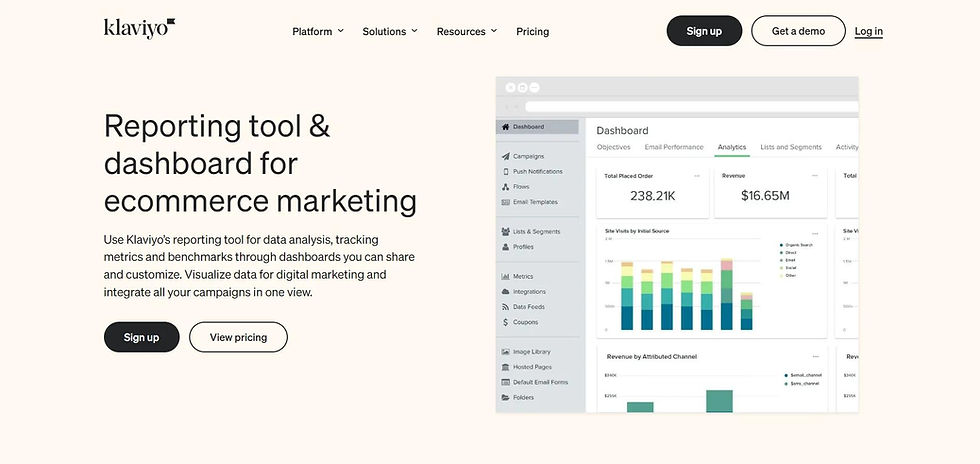
As well as its design-function, Klaviyo also offers sophisticated analytics for e-commerce brands. It can answer data-first questions around:
Which email generated revenue?
Which flow drives the most sales?
What is customer lifetime value (CLV)?
Which segments convert best?
It integrates well with Shopify, so this tight connection is its biggest strength. You’ll find easy-to-use dashboards and more data at your fingertips than you need!
Cost: Mid
Expertise: Beginner-friendly
Braze

Braze also has a strong analytics offering for e-commerce. Much of its data is based on real-time user behaviour that extends further than your email marketing.
It offers event tracking, cross-channel engagement data, strong A/B test analytics and even life-cycle tracking across customer journeys.
While it’s not as native to e-commerce as Klaviyo, its extensive data offering means other sectors can also find this tool useful.
Cost: High
Expertise: Mid-expert
All-in-one platforms for email marketing
For many teams, the most useful tools are the ones that do a little bit of everything - design, automations, and analytics.
Below are two of the most commonly used platforms, we’ll compare the more affordable MailChimp and the more extensive CRM (Customer Relationship Manager), HubSpot
MailChimp

Probably the most well-known email marketing platform is MailChimp. It’s especially designed for beginners and small teams, as it focuses on manageable activities like:
Sending newsletters
Simple marketing automation
Audience management
Basic analytics
It does everything from contact list segmentation to single analytics. While it’s not as extensive on the data or automation side as other tools on this list, it’s a great entry-level tool for those starting their email journey or with limited needs.
Cost: Low (subscription-based)
Expertise: Beginner-friendly
HubSpot

On the other hand, HubSpot is not just an email marketing platform but an extensive CRM that extends to website development, sales teams, and complex customer journeys.
Its complexity is reflected in the price, which can be quite hefty for larger automation needs in bigger email campaigns.
This is a great tool, but one that shouldn’t be used only for its email functionality - it’s best onboarded as a core business CRM.
Cost: High
Expertise: Mid-expert


Comments