
Best content management system for social media: 2025 guide

Updated: Oct 25, 2025

So, you want to get more organised with your content? Do you want to optimise social media traffic and promote your brand? Then, a content management system for social media could be a lifesaver.
It’s 2025, and social media is serious business. Whether you’re selling products or services, social media content is a great way to build a community, raise brand awareness, and ultimately sell more.
From LinkedIn to IG, to TikTok, to Facebook and all the other platforms in between, let’s get organised in 2025!
Whether you’re a one-person band trying to launch a business or just want to get more methodical about your marketing output, keep reading.
Why use a content management system (CSM)?
So the big question is, why use a management system if you can just post on the platform itself?
These systems are all about efficiency. When you have multiple social platforms, multiple users, and multiple content types, things can easily get muddled and confusing. Manual posting can be useful if you have the time and resources to do it, but most businesses don’t.
Social media content isn’t just about posting. It involves ideation, creation, scheduling, collaboration, analytics, and sometimes, advertising. A robust social media CMS streamlines these workflows by offering:
Centralised scheduling: Plan and automate posts across different platforms.
Content calendar: Visualise and organise campaigns ahead of time.
Collaboration tools: Assign roles, approve content, and coordinate with your team.
Performance analytics: Track engagement, reach, click-through rates, and ROI.
Asset management: Store, edit, and reuse media content efficiently.
As the complexity of content marketing grows, using spreadsheets or managing posts manually is no longer feasible. Investing in a reliable CMS can save time, reduce errors, and boost your social media strategy.
How much are social media content management systems?
Much like any content marketing tool, you’ll find a huge range of costs online. Expect anything from free accounts to tools like Emplifi, whose top package can cost up to an eye-watering £60,000 annual cost.
Typically, these tools are paid for in a couple of ways:
Monthly fee (cancel anytime)
Monthly fee on a retainer (you might be locked into a 3, 6 or even 1 year contract)
Annual payments
But be warned! Finding exact costs online can be a nightmare. Some platforms give really clear pricing models; an example is the SEO toolkit SEMrush:
Some might require a little more investigation, whether that’s a conversation with a team member or referral info.
For small businesses, these high costs are often unattainable. You don’t have the luxury of forking out for an unlimited marketing budget. But don’t worry, you still have options!
Where to find a free social media content management system
Remember, you don’t have to pay huge monthly costs to be able to effectively manage your content.
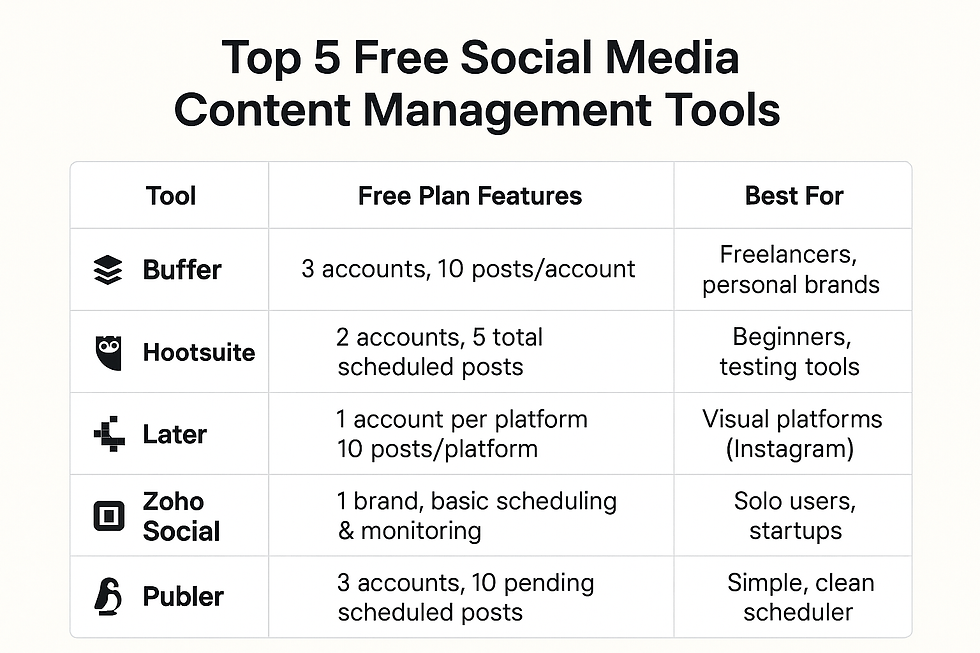
Several platforms offer solid features at no cost, ideal for individuals, startups, or small teams. For example, Buffer allows you to manage 3 social accounts and schedule up to 10 posts per account, making it great for freelancers or personal brands. Hootsuite’s free plan offers 2 social profiles and 5 scheduled posts, useful for basic testing.
These tools are accessible in the UK, support local time zones (GMT/BST), and are generally compliant with UK GDPR standards. Most offer integration with major platforms like Facebook, Instagram, X (Twitter), LinkedIn, and Pinterest.
For a more technical or self-hosted option, tools like Elgg or HumHub provide open-source alternatives, and workflows using Airtable with Zapier or Make can offer custom scheduling systems.
Choosing the right tool depends on your needs, such as post volume, platforms used, and whether you need collaboration features.
We also definitely recommend taking advantage of free trials.
What is the best social media CMS?
Before choosing a CMS, consider the following essential features:
Multi-platform integration: Ensure the CMS supports all your target social networks, including emerging platforms like Threads or TikTok.
User-friendly interface: A clutter-free, intuitive dashboard helps teams work more efficiently.
Team collaboration and approval workflow: Useful for agencies and large teams that need an organised approval process.
AI and automation: Features like AI-generated captions, smart scheduling, or auto-responses can streamline operations.
Advanced analytics: Insightful reports help refine your content strategy and justify ROI to stakeholders.
Customer support and training: A responsive support team and training resources help you get the most from your investment.
Let’s take a look at some of the tools themselves.
Best for: Mid-size to large businesses, agencies
Sprout Social continues to be a powerhouse in 2025, offering a full suite of tools for publishing, monitoring, analytics, and engagement.
Key features:
Unified Smart Inbox
Powerful content calendar
CRM tools for social customer care
Team collaboration with approval workflows
Advanced reporting and competitor analysis
Pros:
Exceptional UI/UX
Enterprise-grade analytics
Great customer support
Cons:
Higher price point
Limited features in lower-tier plans
Best for: Small businesses, freelancers, and marketers needing versatility
Hootsuite is a veteran in the social media CMS space and has kept up with trends by integrating AI tools and better UX in 2025.
Key Features:
Schedule posts for 20+ social networks
Drag-and-drop calendar
Customisable reports
Canva integration
AI content generator
Pros:
Broad social media integration
Affordable pricing tiers
User-friendly mobile app
Cons:
UI can feel dated
Customer support can be slow at times
Best for: Startups and solopreneurs
Buffer remains a favourite for users seeking simplicity and affordability. While not as advanced as Sprout or Hootsuite, it excels in clean design and ease of use.
Key features:
Simple post scheduling and publishing
Team collaboration (on higher tiers)
Engagement tools
Custom landing pages for link in bio
Integration with Shopify, WordPress
Pros:
Very intuitive interface
Affordable for small teams
Transparent pricing
Cons:
Limited analytics
No listening or monitoring features
Best for: Creative teams and agencies
Loomly stands out for its brand-centric approach and strong focus on content creation. It’s particularly helpful for teams that need editorial oversight and brand consistency.
Key Features:
Content inspiration and ideas
Asset library
Workflow automation with approval layers
Ad previews for promoted content
Pros:
Affordable with robust features
Great content planning capabilities
Ideal for managing multiple brands
Cons:
Limited listening or engagement features
Basic analytics on lower-tier plans
Best for: Instagram and TikTok-heavy brands
Later has evolved from an Instagram scheduler to a well-rounded CMS with strong visual planning tools. It's ideal for eCommerce and influencer-focused content.
Key Features:
Visual drag-and-drop calendar
Best time to post recommendations
TikTok and Instagram Reels support
Link in bio mini-site
Creator and influencer tools
Pros:
Excellent for visual content
Deep analytics for Instagram
Simple and affordable plans
Cons:
Not ideal for Twitter or LinkedIn-heavy users
Limited team collaboration features
Need help with a CSM?
We know this is a lot of information to take in, especially if you're at the beginning of your content marketing journey.
At BlackCat, we've been in the marketing game for over 15 years. So, if you need help with:
Advice on:
What CSM to use
How to shape your social media strategy
Actions like:
Getting onboarded onto a tool
Managing your CSM
Producing the content itself
Or all of the above! Get in touch and start the conversation with us.


Synchronizing real-time inventory levels, pricing tiers, and order updates between an enterprise ERP and a high-volume storefront is essential to prevent overselling. Relying on manual data transfers or outdated batch processing often causes stock discrepancies and customer dissatisfaction. Implementing structured API synchronization workflows like those detailed at https://perspectiveteam.com/services/magento-integration/ ensures automated, two-way data flow between backend ERP software and the retail platform.
keonhacai mình thấy bạn bè nhắc hoài nên ghé thử cho biết, ai dè vào cái là nhìn khá thoáng. Trang không kiểu nhồi chữ dày đặc, mà chia khung nội dung rõ ràng nên lướt nhanh vẫn không bị lạc. Mình chỉ xem sơ thôi chứ không ngồi đọc kỹ, chủ yếu để ý cách họ làm giao diện cho dễ dùng. Điểm mình ưng là cái menu đặt ngay chỗ dễ thấy, bấm qua lại mượt, không phải mò mẫm nhiều. Mấy phần thông tin cũng canh theo dạng bảng cột nhìn gọn, khoảng cách chữ vừa phải nên đỡ mỏi mắt. Nói chung cảm giác giống kiểu trang làm để người ta xem nhanh, không cần mất…